Cost Optimization with LVM Thin Provisioning — and How the Cloud Has Moved Beyond It
Introduction
One of the most common storage problems in enterprise environments is over-provisioning.
Imagine a department requests 500 GB of storage for a new application. To avoid future requests, the infrastructure team allocates the entire 500 GB immediately.
Six months later, the application has only consumed 50 GB.
The remaining 450 GB sits unused while other teams continue requesting additional storage. In cloud environments, SAN infrastructures, and virtualized data centers, this translates directly into unnecessary costs.
This project demonstrates how I used Linux Logical Volume Manager (LVM) on AlmaLinux to implement Thin Provisioning, allowing applications to receive large virtual storage allocations while consuming only the storage they actually use. I also implemented an automated monitoring solution that alerts administrators before storage exhaustion becomes a production issue.
Just as important as the implementation itself is understanding where this technique sits in the bigger picture. LVM thin provisioning was the standard answer to this problem for on-prem and self-managed virtual machines. In modern cloud environments, much of this problem is now solved differently — sometimes better. Later in this article, I break down how AWS, Kubernetes, and object storage have each taken this same problem and automated it further.
The Business Problem
Traditional storage allocation reserves physical space immediately.
For example:
- Requested Storage: 500 GB
- Actual Usage: 50 GB
- Wasted Reserved Space: 450 GB
Now imagine ten departments making similar requests.
| Departments | Requested | Actual Usage |
|---|---|---|
| 10 | 500 GB each | ~50 GB each |
Physical storage reserved:
5 TB
Actual storage consumed:
500 GB
This inefficient allocation significantly increases infrastructure costs.
Understanding Thin Provisioning
Thin Provisioning separates logical capacity from physical capacity.
Instead of allocating all requested storage immediately, Linux allocates physical blocks only when data is actually written.
This means:
Application sees:
500 GB AvailablePhysical storage consumed:
Only the blocks containing dataThis approach dramatically improves storage utilization while allowing administrators to oversubscribe storage safely.
Storage Architecture
The implementation follows the standard LVM architecture.
Physical Disk
      │
      ▼
Physical Volume (PV)
      │
      ▼
Volume Group (VG)
      │
      ▼
Thin Pool
      │
 ┌────┴─────────┐
 ▼              ▼
Thin LV 1   Thin LV 2
Each layer has a specific responsibility.
Physical Volume (PV)
The physical disk initialized for LVM management.
Volume Group (VG)
A storage pool that combines one or more physical volumes.
Thin Pool
The actual physical storage from which thin logical volumes consume space.
Thin Logical Volume
A virtual disk presented to applications that only consumes physical storage as data is written.
Lab Environment
- Operating System: AlmaLinux
- Virtual Machine Disk: 60 GB
- Additional Lab Disk: 20 GB
- Filesystem: XFS
- Storage Manager: LVM2
The operating system disk remained untouched throughout the project.
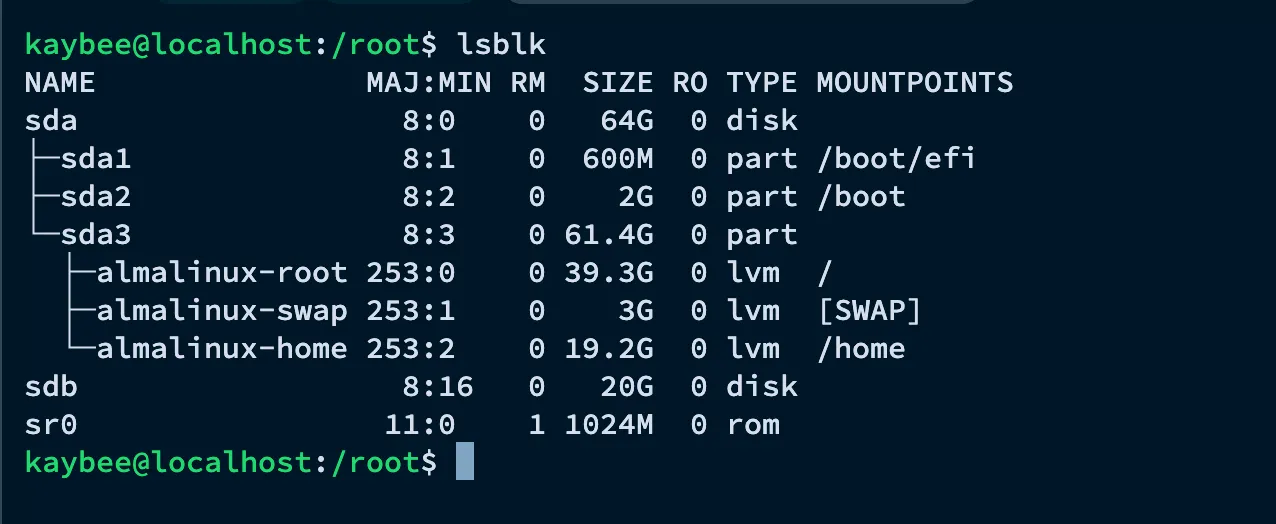
Before starting, lsblk confirms the base layout: a 64 GB sda disk already carved up into the AlmaLinux root, swap, and home logical volumes, plus a fresh, untouched 20 GB sdb disk that will become the thin-provisioned storage pool.
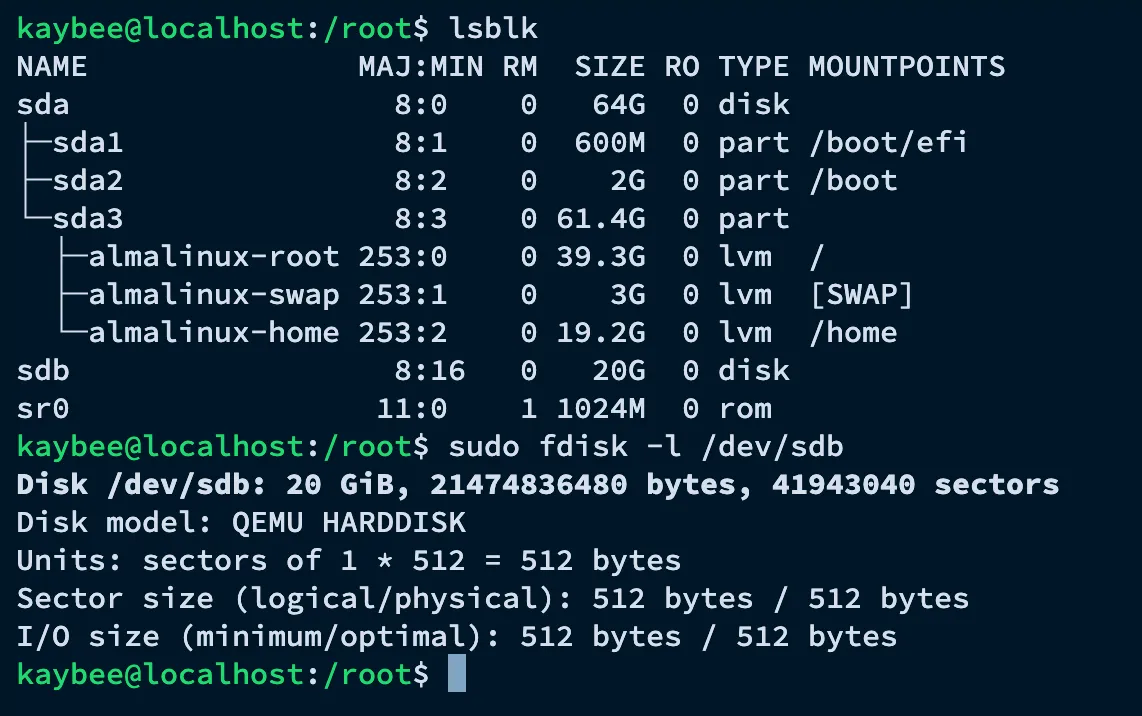
Running fdisk -l /dev/sdb confirms the disk’s raw geometry before it’s brought under LVM management — 20 GiB, 512-byte sectors, no partition table yet.
Implementation
Step 1 – Initialize the Physical Volume
sudo pvcreate /dev/sdbThis converts the raw disk into an LVM-managed disk.
Step 2 – Create the Volume Group
sudo vgcreate corp_storage /dev/sdbThe volume group becomes the central storage pool.
Step 3 – Create a Thin Pool
sudo lvcreate -L 15G -T corp_storage/thinpoolsInstead of exposing storage directly, the thin pool manages physical block allocation.
The output confirms the pool was created, and lvs shows the new thinpools volume sitting alongside the existing AlmaLinux volumes — 15 GB reserved, 0% consumed so far.

Step 4 – Create Thin Logical Volumes
sudo lvcreate -V 50G -T corp_storage/thinpools -n app1

sudo lvcreate -V 100G -T corp_storage/thinpools -n app2
Although the virtual capacity totals 150 GB, the physical storage remains only 15 GB.
No physical blocks are consumed until applications begin writing data.
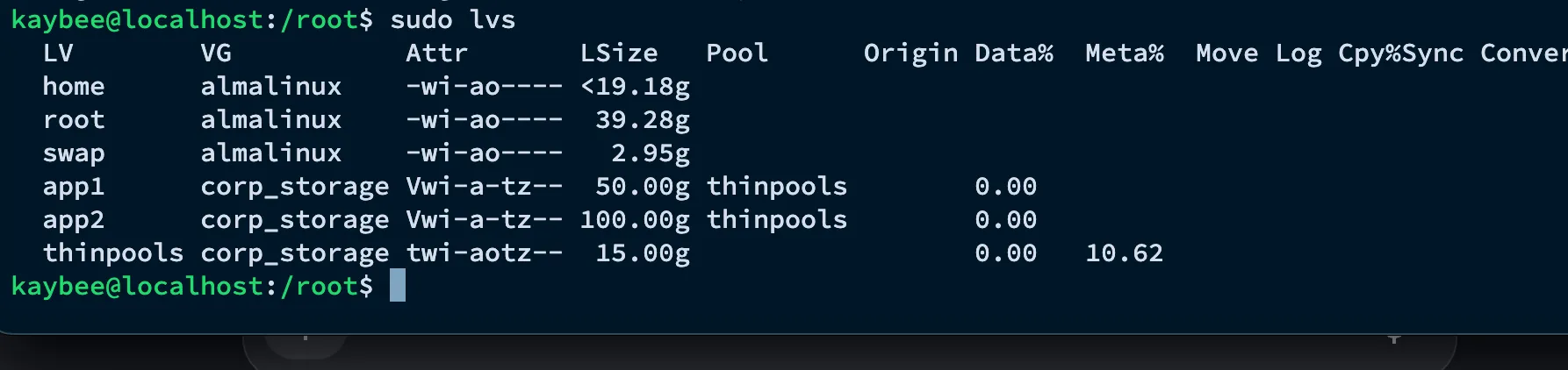
lvs now shows both app1 (50 GB) and app2 (100 GB) as thin volumes mapped to the thinpools pool, each still reporting 0% data usage — the virtual size is already committed, but no physical space has actually been consumed.
Step 5 – Create Filesystems
sudo mkfs.xfs /dev/corp_storage/app1

sudo mkfs.xfs /dev/corp_storage/app2
Step 6 – Mount the Filesystems
sudo mkdir /app1
sudo mkdir /app2

sudo mount /dev/corp_storage/app1 /app1
sudo mount /dev/corp_storage/app2 /app2
Applications now interact with these logical volumes as though they were physical disks.
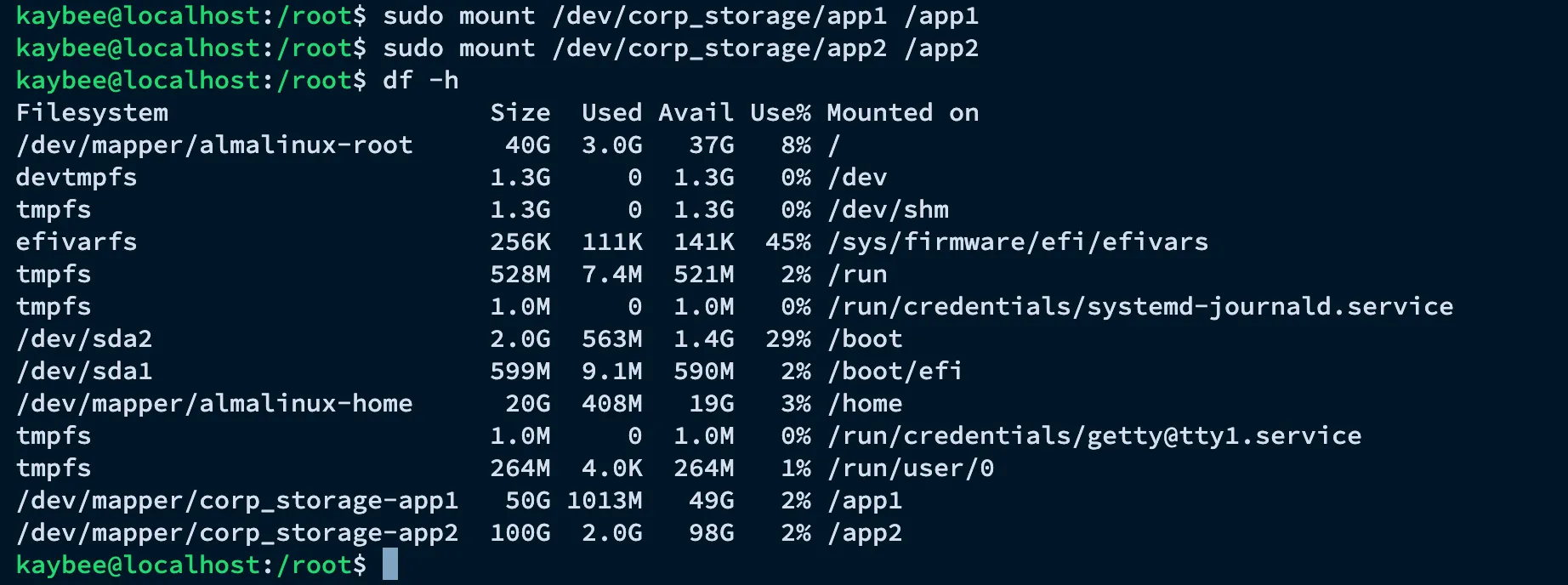
df -h confirms both volumes are live and mounted — /app1 presenting a full 50 GB and /app2 presenting a full 100 GB — even though the entire pool behind them is only 15 GB physically.
Demonstrating Thin Provisioning
Initially, the thin pool reports almost no physical usage.
Data Usage: 0%Writing a 1 GB file:
dd if=/dev/zero of=/app1/testfile bs=1M count=1024Now the thin pool allocates physical blocks.
Monitoring confirms storage consumption increases only as data is written.
This demonstrates the primary benefit of thin provisioning.
Automated Monitoring
Thin provisioning introduces one important risk.
If administrators oversubscribe storage and every application begins consuming its allocated space simultaneously, the thin pool can become full.
To mitigate this risk, I created a monitoring script.
#!/bin/bash

usage=$(lvs --noheadings -o data_percent corp_storage/thinpools | tr -d ' %')

usage=${usage%.*}

if [ "$usage" -ge 70 ]; then
    logger "CRITICAL: Thin Pools usage is ${usage}%"
elif [ "$usage" -ge 50 ]; then
    logger "WARNING: Thin Pools usage is ${usage}%"
fi
The script checks thin pool utilization and writes warning messages to the system journal when predefined thresholds are exceeded.
The script is executed every five minutes using cron.
*/5 * * * * /usr/local/bin/thin_monitor.shThis provides proactive storage monitoring before production services are affected.
Why This Matters — and Where the Industry Has Moved
The LVM setup above solves the over-provisioning problem, but it’s worth being direct about what it actually is: a self-managed, host-level solution. It still requires a human (or a script) to notice a threshold breach, decide on an action, and manually intervene — lvextend, xfs_growfs, capacity planning meetings, and so on. That’s exactly the model this project was built to demonstrate, and it’s still the correct approach for on-prem data centers, bare-metal servers, and any environment where engineers are managing the physical or virtual disk layer directly.
Cloud environments, however, have largely abstracted this problem away. As a cloud engineer, understanding why the industry moved past manual LVM monitoring — and what replaced it — matters just as much as knowing how to configure a thin pool. Here’s how the same problem is solved today.
1. Elastic, API-Driven Block Storage
In place of a cron job reading lvs output and writing to the system journal, cloud platforms close the loop automatically:
- A monitoring tool (like AWS CloudWatch) detects the disk is at 70%.
- It triggers an automated event — an AWS Systems Manager Automation document or a Lambda function — that calls the AWS API to expand the EBS volume directly (e.g., from 50 GB to 100 GB).
- The OS layer: no LVM is involved at all. The operating system detects the size change on the fly, and a cloud-init script or a native OS command (
growpart, followed byresize2fsorxfs_growfs) expands the filesystem directly on the raw block device.
This is the same alerting logic I built with lvs and logger — just triggered by CloudWatch instead of cron, and acting through an API call instead of a human running lvextend.
2. Managed Serverless & Shared Storage
Rather than sizing a disk at all, many enterprises shift workloads to fully managed file storage that scales automatically and invisibly.
- The services: AWS EFS (Elastic File System), AWS FSx, or Azure Files.
- How it works: these are network-attached storage systems. There’s no “50 GB” to provision — you mount a storage path to the server and it grows as needed.
- The financial benefit: billing is based on the megabytes actually written. A department that doesn’t touch its storage for four months pays next to nothing; a department that suddenly writes 5 TB is accommodated instantly, with no scripting, no thin pool sizing, and no capacity planning.
This removes the exact risk my monitoring script was built to catch — a full thin pool — by removing the fixed pool entirely.
3. Containerized Storage Orchestration (Kubernetes & CSI)
For applications running in containers, storage is abstracted away from the underlying VM entirely through the Container Storage Interface (CSI).
- How it works: engineers define storage needs declaratively with a
PersistentVolumeClaim(PVC). - Auto-expansion: Kubernetes’ native
allowVolumeExpansion: truemeans that when a container’s storage fills up, the Kubernetes controller talks directly to the cloud provider’s API behind the scenes. It resizes the cloud volume and grows the filesystem inside the container automatically — zero human intervention, zero LVM.
Where my project handles growth at the VM/host level, Kubernetes handles it at the workload level, decoupling storage entirely from any single server.
4. Direct Object Storage
The most modern pattern skips local disk growth altogether by changing how the application writes data in the first place.
- The services: AWS S3 or Google Cloud Storage.
- How it works: instead of saving a file to
/app1/data/file.pdfon a mounted volume, the application uses an API call to upload the file directly to an S3 bucket. - Object storage has no concept of partitions, volumes, or “running out of disk space” — it is effectively infinite, highly durable, and removes the storage-growth problem from the application layer entirely.
Comparing the Two Worlds
| LVM Thin Provisioning (this project) | Cloud-Native Approach | |
|---|---|---|
| Capacity decisions | Manual (lvextend, pvresize) |
Automated via API (CloudWatch → Lambda/SSM, CSI, EFS) |
| Monitoring | Custom script + cron + logger |
Built-in metrics and managed alerting |
| Scaling trigger | Human reads alert, takes action | Event triggers automated remediation |
| Best fit | On-prem / self-managed VMs, bare metal | Cloud VMs, containers, serverless workloads |
| Underlying philosophy | Oversubscribe physical storage safely | Remove the concept of fixed physical storage entirely |
Neither approach is “wrong” — they solve the same underlying cost problem for different environments. LVM thin provisioning is still the right tool when you control the physical or virtual disk layer directly and don’t have a cloud API to call. But in cloud-native environments, the direction of travel is clear: move the responsibility for capacity management off the human and onto the platform, whether that’s an EBS auto-scaling event, a PVC, or an S3 bucket that never runs out of room.
Skills Demonstrated
This project demonstrates practical experience with:
- Linux Storage Administration
- LVM2
- Physical Volumes
- Volume Groups
- Thin Provisioning
- Thin Pools
- XFS Filesystems
- Shell Scripting
- Cron Automation
- Storage Monitoring
- System Logging
- Enterprise Storage Optimization
- Understanding of cloud-native storage scaling (EBS automation, EFS/FSx, Kubernetes CSI, S3 object storage) and how it relates to traditional host-level storage management
Lessons Learned
Before completing this project, I understood that LVM allowed online storage expansion.
Building this solution helped me understand something more important.
LVM is not simply a resizing tool — it provides an abstraction layer between physical storage and applications. Thin provisioning extends that abstraction by allowing organizations to allocate storage intelligently rather than physically reserving unused capacity. However, this flexibility introduces operational responsibility. Monitoring thin pool utilization becomes just as important as implementing thin provisioning itself.
The bigger lesson came from stepping back and asking where this technique fits in a modern infrastructure stack. LVM thin provisioning automates allocation, but it still relies on a human-in-the-loop for action. Cloud-native storage — elastic EBS volumes, EFS, Kubernetes CSI, and S3 — takes the same core idea (don’t reserve what you don’t need) and closes the loop completely, removing the human from routine capacity decisions. Understanding both is what separates knowing a command from understanding the problem: the goal was never really “learn LVM,” it was “learn how infrastructure teams stop wasting money on storage,” and that lesson holds whether the disk lives in a data center rack or behind a cloud API.
Conclusion
Thin provisioning is a practical example of how Linux infrastructure can reduce operational costs while improving resource utilization. By combining LVM Thin Provisioning with automated monitoring, organizations can safely maximize storage efficiency without sacrificing reliability — and this remains the correct approach anywhere the physical or virtual disk layer is self-managed.
At the same time, the cloud has largely automated this exact problem away for workloads that live in AWS, Azure, or Kubernetes: elastic block storage, managed file systems, container storage orchestration, and object storage all remove the need for a human to watch a threshold and intervene. This project reinforced that enterprise infrastructure work is not just about running commands — it’s about understanding the business problem, selecting the right technology for the environment you’re actually operating in, and recognizing when that technology has been superseded by a platform-native alternative.