Building Fault-Tolerant Storage with mdadm RAID1 and a Hot Spare — and Why the Cloud Solves This Differently
Introduction
One rule underpins enterprise infrastructure engineering: hardware always fails.
Virtualization and high-level software layers abstract away storage engineering for many developers, but true infrastructure engineers understand how the Linux kernel maps raw disk blocks to manage data redundancy — and what happens the moment one of those disks dies.
This project demonstrates how I configured a native, host-level RAID1 (mirroring) array with a dedicated hot spare using mdadm on Linux, simulated a hard drive crash, and observed how the system healed itself automatically with zero application data loss.
Just as important as the implementation itself is understanding where this technique sits in the bigger picture. mdadm-based RAID was the standard answer to hardware fault tolerance for decades of self-managed servers. In modern cloud environments, much of this same problem is now solved differently — sometimes automatically. Later in this article, I break down how AWS, distributed storage systems, and managed database services have each taken this same problem and abstracted it further.
The Business Problem
A single disk is a single point of failure.
If an application’s data lives on one physical (or virtual) drive and that drive fails, the outcome is:
- Immediate data loss
- Application downtime
- Manual recovery from backup, if one exists
For any production workload, this risk is unacceptable. Redundancy needs to be built in at the storage layer itself, so a single hardware failure doesn’t become an incident.
RAID1 solves this by mirroring every block of data across two or more disks. Adding a hot spare takes this further — a standby disk sits idle, ready to be pulled into the array automatically the instant a mirror disk fails, restoring full redundancy without a human needing to physically swap hardware first.
Understanding RAID1 with a Hot Spare
RAID1 writes identical data to two disks simultaneously. If one disk fails, the array keeps serving reads and writes from the surviving disk with zero interruption.
A hot spare adds a third disk that is:
- Attached to the array
- Kept idle and unused during normal operation
- Automatically activated by the kernel the moment an active mirror disk is marked as failed
This means:
Application sees:
Continuous, uninterrupted access to /mnt/secure_vaultBehind the scenes:
Kernel detects the failed disk → detaches it → activates the spare → begins re-mirroringNo manual intervention is required to restore redundancy — only to physically replace the failed drive afterward.
The Modern Paradigm Shift: Why Do We Use This in the Cloud?
Engineers moving to cloud environments often ask: “If cloud providers abstract away storage hardware with services like AWS EBS or GCP Persistent Disks, why do we still need kernel-level tools like mdadm?”
The truth is, the cloud runs on top of bare-metal Linux infrastructure, and the exact storage patterns used by mdadm power the cloud’s foundational layers:
- Bypassing Cloud Throughput Bottlenecks: Standard cloud block storage volumes have built-in IOPS limits. When running high-performance open-source database clusters (PostgreSQL, MySQL, Elasticsearch), cloud architects attach multiple raw, ultra-low-latency NVMe instance-store SSDs directly to a virtual machine and bind them together using
mdadmRAID0 or RAID10 to multiply read/write throughput. - Storage Cluster Architecture: High-performance storage platforms, on-premises data centers, and edge computing environments rely on software-defined storage tools (Ceph, GlusterFS, local hypervisors). Understanding kernel device-mapping mechanics is a prerequisite for deploying and debugging these distributed storage systems.
Architecture
The layout maps raw storage devices down into a single logical, fault-tolerant volume path.
Raw Disk: /dev/sdb ──┐
                      ├──▶ RAID1 Array Device: /dev/md0 ──▶ XFS Filesystem ──▶ /mnt/secure_vault
Raw Disk: /dev/sdc ──┘

Hot Spare: /dev/sda ┄┄▶ (automatic kernel failover into /dev/md0)
Raw Disks
/dev/sdb and /dev/sdc are the two active member disks that hold mirrored copies of every block. /dev/sda is held in reserve as the hot spare. A fourth disk, /dev/sdd, is present on the host but is not part of the array at all.
RAID1 Array (/dev/md0)
The logical block device the kernel presents to the rest of the system — a single mirrored volume built from the two active disks.
Hot Spare
An idle disk attached to the array, invisible to applications, that the kernel automatically promotes into active duty on failure.
Filesystem Layer
XFS formatted directly on top of the RAID device, then mounted like any other volume.
Lab Environment
- Operating System: AlmaLinux
- Disks:
/dev/sda,/dev/sdb,/dev/sdc— three raw, unpartitioned virtual disks used to build the array (sdb+sdcas the active mirror,sdaas the hot spare) /dev/sdd— an additional disk present on the host, deliberately left out of the array- Filesystem: XFS
- Storage Manager:
mdadm
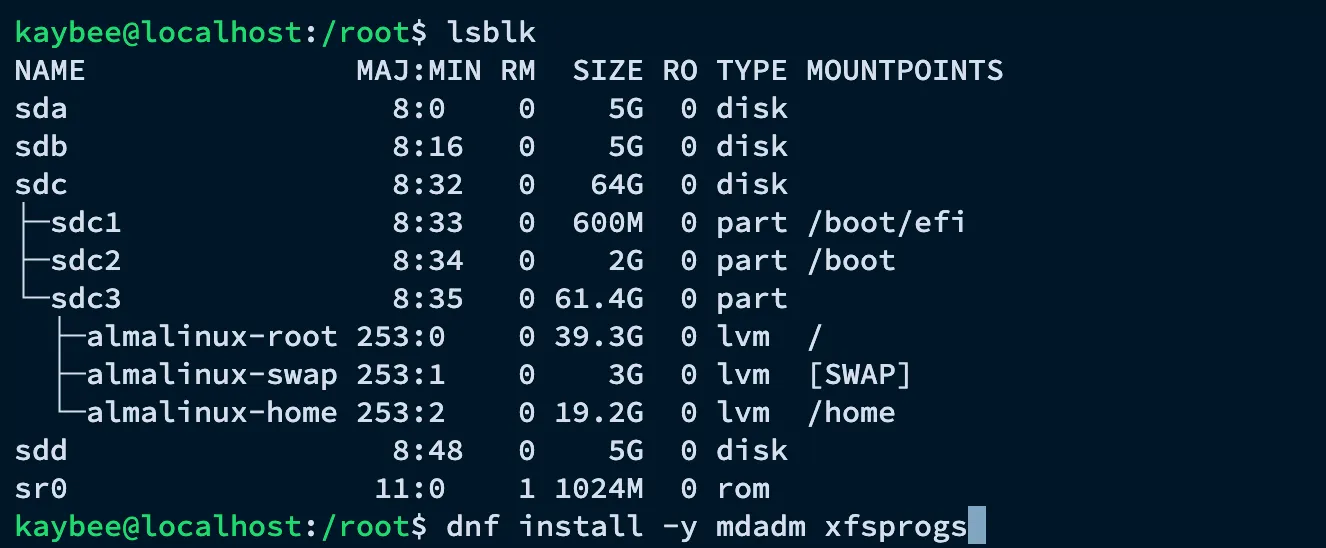
lsblk confirms the starting layout before anything is touched, and the mdadm and xfsprogs packages are installed to prepare the host.
Implementation
Step 1 – Wipe the Target Disks and Create the Array
We wipe any old filesystem headers from our raw storage devices to ensure a clean deployment, then assemble the array using two active disks and one standby drive.
# Clean historical metadata blocks from targets
sudo wipefs -a /dev/sdb /dev/sdc /dev/sda

# Create the RAID1 device path — sdb and sdc become the active mirror, sda becomes the hot spare
sudo mdadm --create /dev/md0 --level=1 --raid-devices=2 --spare-devices=1 /dev/sdb /dev/sdc /dev/sda
mdadm prompts to confirm the write-intent bitmap and the array layout before it starts building /dev/md0.
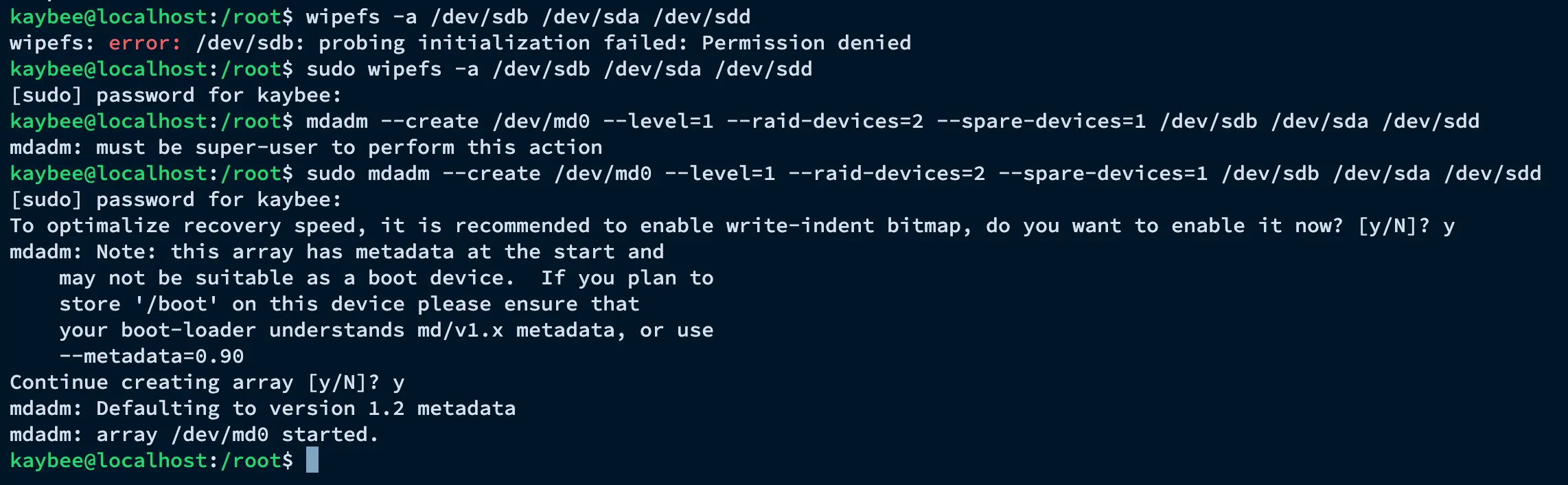
Watching /proc/mdstat shows the mirror syncing in real time until both active devices report [UU] — fully synchronized — with the spare sitting idle alongside them.

Step 2 – Format and Mount the Array
With the underlying virtual block device (/dev/md0) successfully initialized, we format it with an XFS file system and map it to a persistent system directory.
# Format the virtual device
sudo mkfs.xfs /dev/md0

# Establish a targeted mount point and associate it
sudo mkdir -p /mnt/secure_vault
sudo mount /dev/md0 /mnt/secure_vault

# Populate a persistent file to verify data integrity
echo "Enterprise Integrity Test" | sudo tee /mnt/secure_vault/vault.txt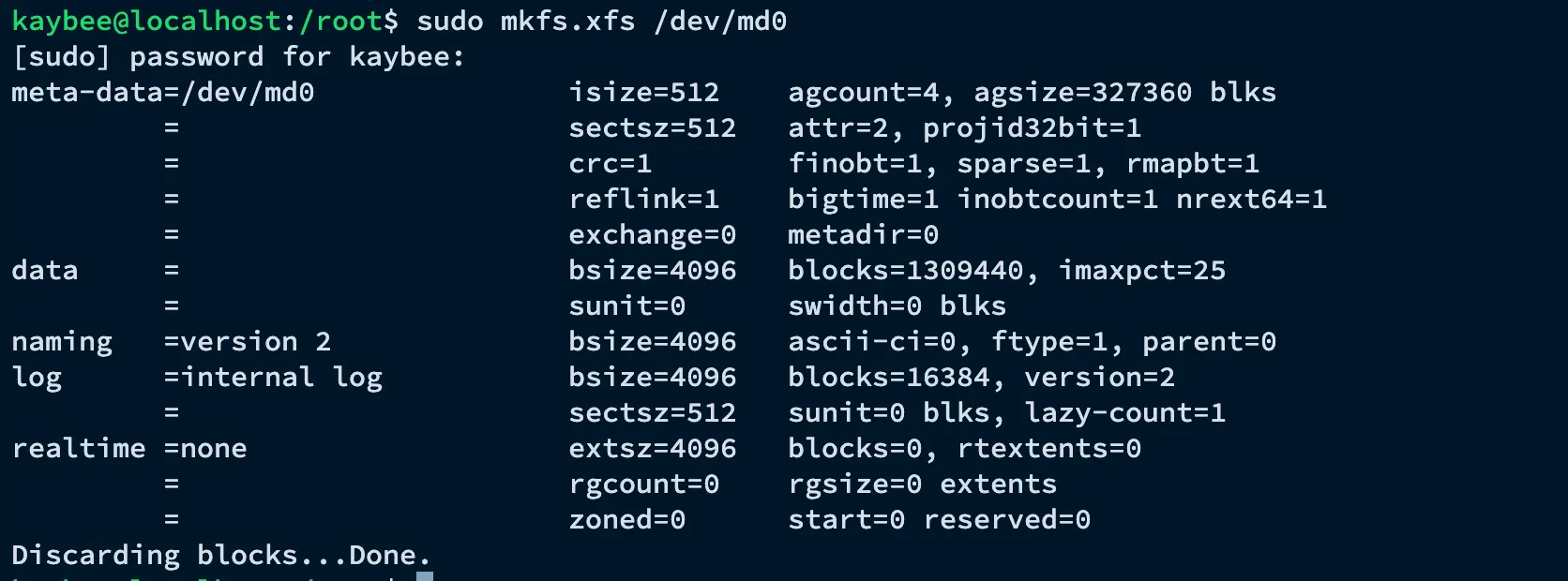
Step 3 – Persist the Layout
To ensure the array automatically mounts on reboot, we persist the layout signature into the mdadm configuration file and add the mount to /etc/fstab.
# Append device signatures to the mdadm configuration file
sudo mdadm --detail --scan | sudo tee -a /etc/mdadm.conf

# Map structural mounting configuration into fstab
echo "/dev/md0 /mnt/secure_vault xfs defaults 0 0" | sudo tee -a /etc/fstab
Fault Injection and Automated Recovery Testing
1. Verification Before Failure
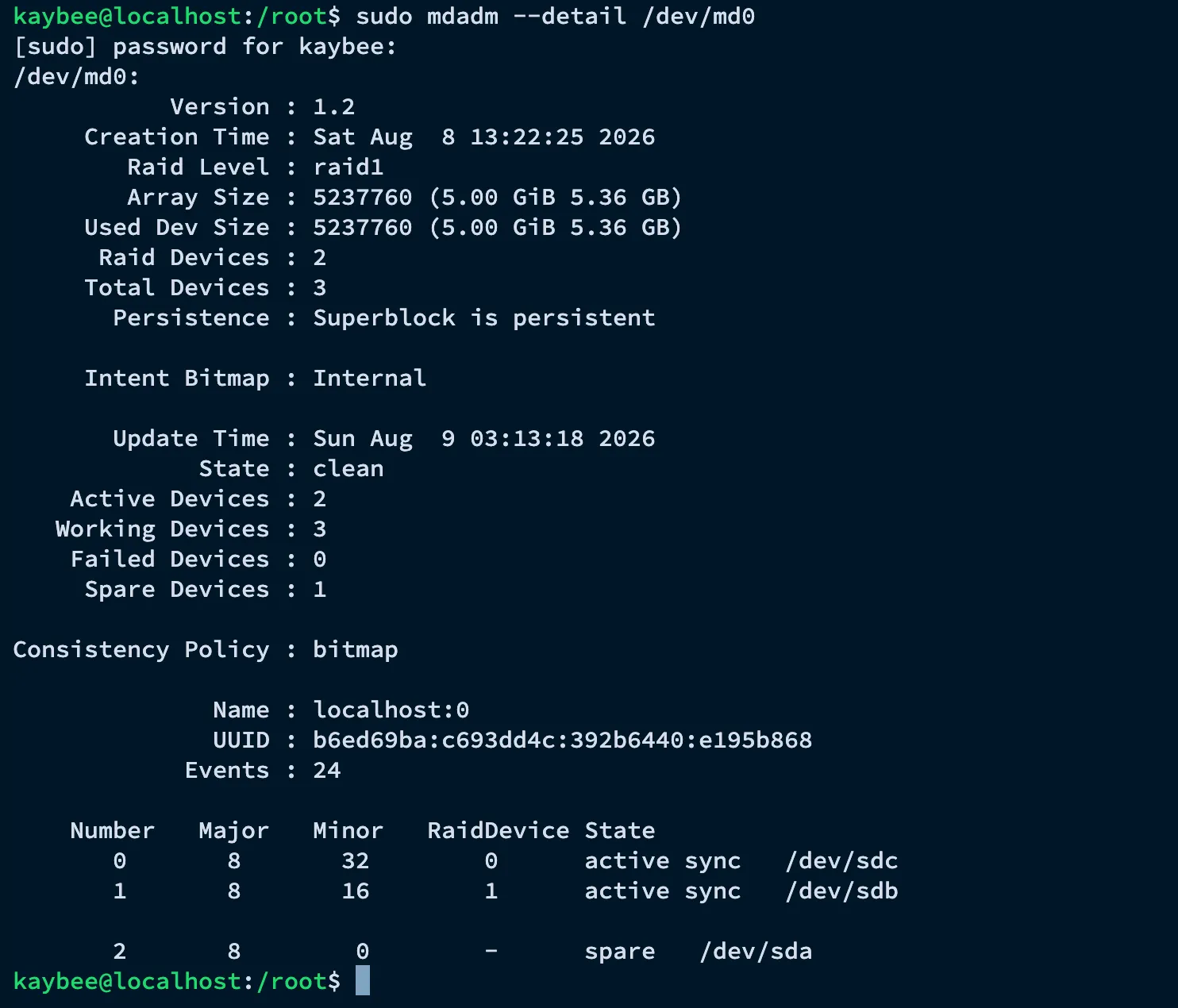
We audit the live array to confirm its active layout:
sudo mdadm --detail /dev/md0The output confirms both active devices (/dev/sdc and /dev/sdb) are working in sync, while the standby drive (/dev/sda) waits silently in the background as the spare.
2. Injecting a Disk Fault State
We simulate a sudden hardware crash by forcing one of the active mirror drives offline:
sudo mdadm --manage /dev/md0 --fail /dev/sdcWhat happens behind the scenes: the Linux kernel instantly flags /dev/sdc as failed. Because we pre-allocated an online hot spare (/dev/sda), the kernel automatically detaches the broken drive, pulls the spare online, and begins background block replication.
Reading /proc/mdstat in real time shows exactly this: sdc marked (F) for failed, and the recovery already underway as the array rebuilds against the promoted spare. With the failed disk confirmed, we drop it from the array:
sudo mdadm --manage /dev/md0 --remove /dev/sdc
The filesystem remained fully accessible throughout this process — no application downtime, no data loss.
3. Re-Establishing Storage Redundancy
With the broken drive detached, we re-introduce /dev/sdc back into the array. Since the array is already healthy with two active devices, it rejoins as the new standby spare — restoring full hot-spare protection:
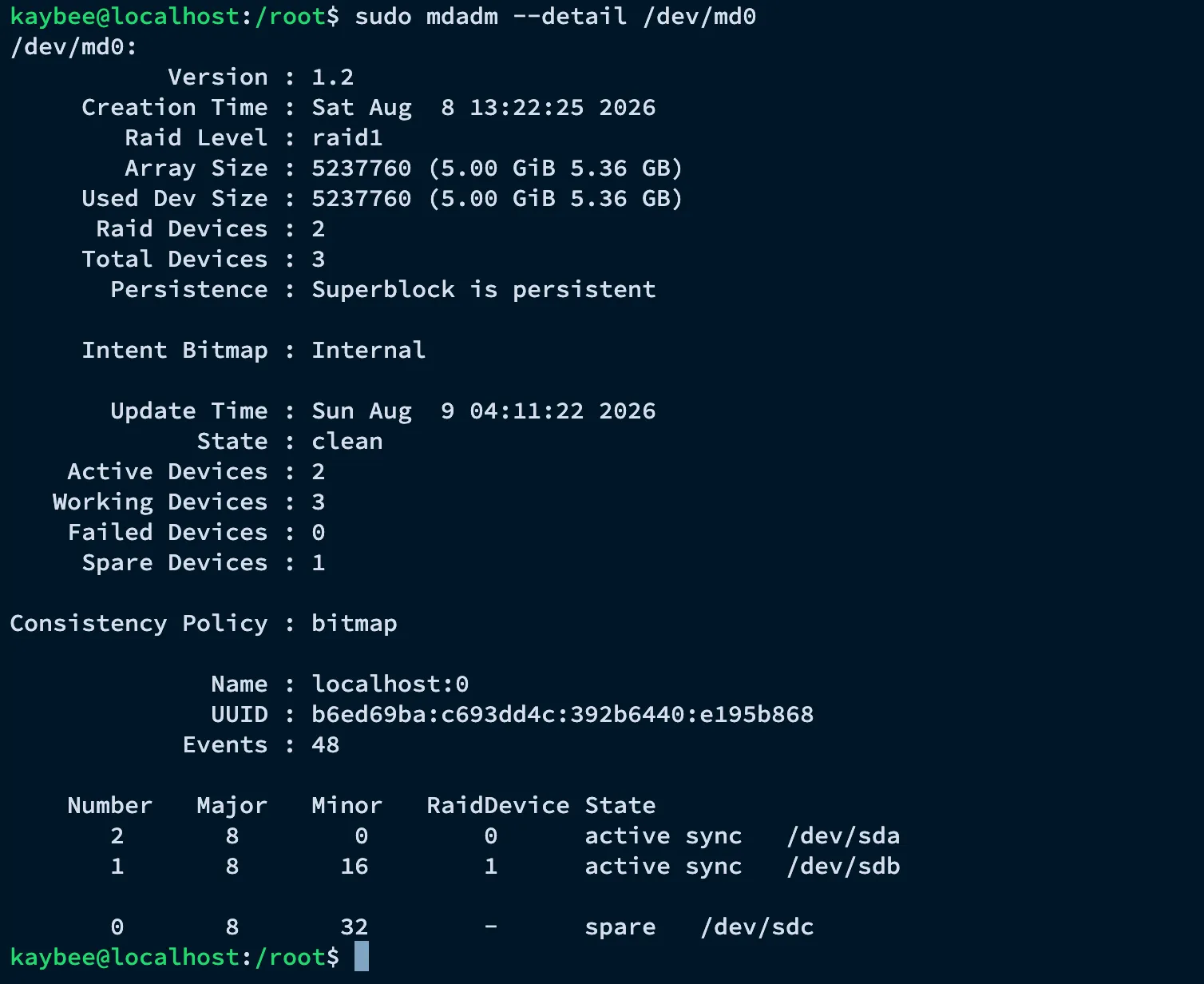
sudo mdadm --manage /dev/md0 --add /dev/sdcThe final audit confirms the array is back to a fully healthy state: /dev/sda and /dev/sdb are the active mirror, and /dev/sdc is now the spare.
Why This Matters — and Where the Industry Has Moved
The mdadm setup above solves the hardware-failure problem, but it’s worth being direct about what it actually is: a self-managed, host-level solution. It relies on a hot spare physically attached to the same machine and an engineer eventually replacing the failed disk. That’s exactly the model this project was built to demonstrate, and it’s still the correct approach for on-prem data centers, bare-metal servers, and any environment where engineers manage the physical or virtual disk layer directly.
Cloud environments, however, have largely abstracted this problem away. As a cloud engineer, understanding why the industry moved past manual RAID monitoring — and what replaced it — matters just as much as knowing how to configure a mirrored array. Here’s how the same problem is solved today.
1. Managed, Self-Healing Block Storage
In place of a hot spare disk sitting on the same host, cloud platforms close the loop at the infrastructure layer itself:
- AWS EBS volumes are already replicated across multiple physical drives within an Availability Zone by the provider — durability is built into the service, not configured by the customer.
- If underlying hardware fails, AWS transparently migrates the volume to healthy hardware; the instance never sees a “failed disk” event the way a bare-metal RAID1 array would.
- Monitoring shifts from
mdadm --monitorand/proc/mdstatto AWS CloudWatch metrics and alarms, with automated remediation triggered through Lambda or Systems Manager rather than a kernel daemon.
This is the same fault-detection-and-response logic built with mdadm — just handled by the platform instead of the host.
2. Distributed and Object Storage
Rather than mirroring individual disks on individual machines, many enterprise workloads move to storage systems that replicate data across an entire cluster or region.
- Ceph and GlusterFS replicate data across multiple nodes, so losing an entire server — not just a disk — doesn’t cause data loss.
- Amazon S3 replicates every object across multiple facilities by default, with eleven-nines durability, and exposes none of the underlying disk or RAID mechanics to the application at all.
This removes the exact risk the hot spare was built to catch — a lost mirror disk — by removing the single-host disk boundary entirely.
3. Managed Database Services
For database workloads specifically, providers increasingly bundle storage redundancy directly into the service.
- Amazon RDS and Aurora handle disk-level replication, automated failover, and hardware fault detection internally — the customer never touches
mdadmand never sees/proc/mdstat. - The trade-off is control: engineers gain reliability without operational overhead, but lose the ability to tune the storage layer directly.
Comparing the Two Worlds
| mdadm RAID1 + Hot Spare (this project) | Cloud-Native Approach | |
|---|---|---|
| Redundancy layer | Manual, host-level mirroring | Built into the managed storage service |
| Failover trigger | Kernel detects fault, activates local spare | Provider transparently migrates data off failed hardware |
| Monitoring | mdadm --detail / /proc/mdstat |
Built-in CloudWatch metrics and managed alerting |
| Recovery action | Engineer physically replaces the failed disk | Provider replaces hardware behind the scenes |
| Best fit | On-prem / bare-metal / self-managed VMs | Cloud VMs, managed databases, object and distributed storage |
Neither approach is “wrong” — they solve the same underlying availability problem for different environments. mdadm RAID1 with a hot spare is still the right tool when you control the physical or virtual disk layer directly and don’t have a managed storage service to lean on. But in cloud-native environments, the direction of travel is clear: move the responsibility for hardware fault tolerance off the individual host and onto the platform, whether that’s a self-healing EBS volume, a replicated Ceph cluster, or a managed RDS instance.
Skills Demonstrated
This project demonstrates practical experience with:
- Linux Storage Administration
mdadmand Software RAID- RAID1 Mirroring and Hot Spare Configuration
- XFS Filesystems
/etc/fstaband Persistent Mount Configuration- Fault Injection and Recovery Testing
- Understanding of cloud-native storage durability (EBS replication, Ceph/GlusterFS, S3, RDS/Aurora) and how it relates to traditional host-level RAID management
Lessons Learned
Before completing this project, I understood that RAID1 meant “data is copied to two disks.” Building this solution helped me understand something more important.
RAID is not simply a copy mechanism — it is an automated, kernel-level response system to hardware failure. A hot spare extends that automation from detection to recovery, closing the gap between a disk dying and redundancy being restored without waiting on a human to notice.
The bigger lesson came from stepping back and asking where this technique fits in a modern infrastructure stack. mdadm automates failover at the host level, but a human is still responsible for physically replacing hardware and configuring the spare in the first place. Cloud-native storage — self-healing EBS volumes, distributed systems like Ceph, and managed database services — takes the same core idea (survive a hardware failure without data loss) and pushes the responsibility further up the stack, off individual hosts entirely. Understanding both is what separates knowing a command from understanding the problem: the goal was never really “learn mdadm,” it was “learn how infrastructure teams survive hardware failure without losing data,” and that lesson holds whether the disk lives in a server rack or behind a cloud API.
Conclusion
Fault-tolerant storage is a practical example of how Linux infrastructure can eliminate single points of failure at the hardware layer. By combining mdadm RAID1 with a hot spare, I built a system that detects a failed disk, restores redundancy automatically, and keeps applications running without data loss — and this remains the correct approach anywhere the physical or virtual disk layer is self-managed.
At the same time, the cloud has largely automated this exact problem away for workloads running in AWS, distributed storage clusters, or managed databases: self-healing block storage, replicated object storage, and managed database services all remove the need for a human-configured hot spare on a single host. This project reinforced that infrastructure work is not just about running commands — it’s about understanding the failure mode you’re protecting against, selecting the right technology for the environment you’re actually operating in, and recognizing when that technology has been superseded by a platform-native alternative.